
PosterMyWall Review 2026: Design, Social, Email and Event Marketing in One Tool
We may earn a commission if you buy through links on this page. It never changes our rankings. How we make money
Disclosure: PosterMyWall paid for this review and gave us a one-month Premium Plus account for testing. They did not see or approve the text before publication, and the rating is ours. How we handle sponsorships.
📘 Table of Contents
Quick Verdict
Best for: Local businesses, venues, event organizers
Free plan: Yes (limited downloads, no AI)
Templates: 4 million+
Stand-out: Event pages, email and social scheduling built in
Bottom line: PosterMyWall is less a pure design tool than a marketing kit for small businesses that promote things: openings, sales, gigs, classes. Making a flyer is fast, the print PDF settings are better than you’d expect, and social scheduling, email campaigns and event pages come in the same plan. The trade-offs are AI tools that need a second prompt and some patience, and a template search that puts timely seasonal designs first, so evergreen templates take some scrolling. If you only need graphics, Canva is the stronger designer; if you need the graphics and the promotion, PosterMyWall is good value.
What Is PosterMyWall?
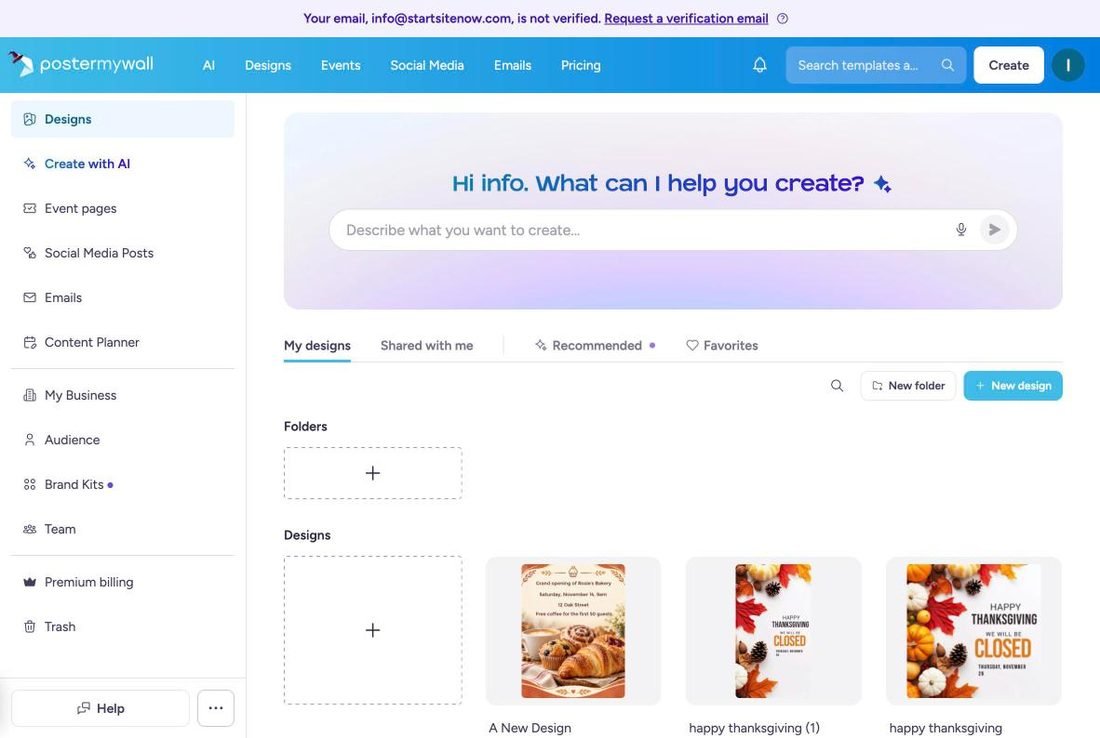
PosterMyWall is a browser-based design platform built around templates: posters, flyers, social media posts, short videos, menus and digital signage. In the last few years it has added the marketing steps that come after the design, so one account now covers:
- Design — 4 million+ templates, a drag-and-drop editor, resizing, animation and video.
- AI tools — create or redesign with a prompt, AI images, background removal, AI video, subtitles, voiceover and upscaling.
- Social media — publish and schedule to nine platforms from a Content Planner calendar.
- Email marketing — 3,000+ email templates, mailing lists, sign-up forms and open/click tracking.
- Event pages — a landing page for an event with registrations and ticketing.
How We Tested
We used a Premium Plus account on 26–27 October 2026 and ran the same kind of tasks we used for our Canva review and Canva vs Adobe Express comparison, timing each one:
- Edit an Instagram post from a template, then resize it to an Instagram Story.
- Find a business flyer template and turn it into a real flyer (a bakery grand opening) with AI.
- Make the AI result editable, change the text, and set up a print PDF.
- Remove a photo background, animate the design and turn it into a short AI video.
- Look through the social scheduling, email and event tools.
We did not connect a real social account, send an email campaign or publish an event page, so for those features we describe what the plan includes rather than how they performed with real audiences. Prices come from PosterMyWall’s official pricing page (US prices, before tax).
Templates and the Editor
The editor is simple and quick to learn. In our test, opening an Instagram post template took about 20 seconds, and changing its text took about a minute. One-click resize to an Instagram Story produced a new copy in about 10 seconds; the layout re-flowed sensibly, but the text stayed small for the taller format and we enlarged it by hand. Text boxes also don’t grow with longer text, so a longer line can break awkwardly until you adjust the box.
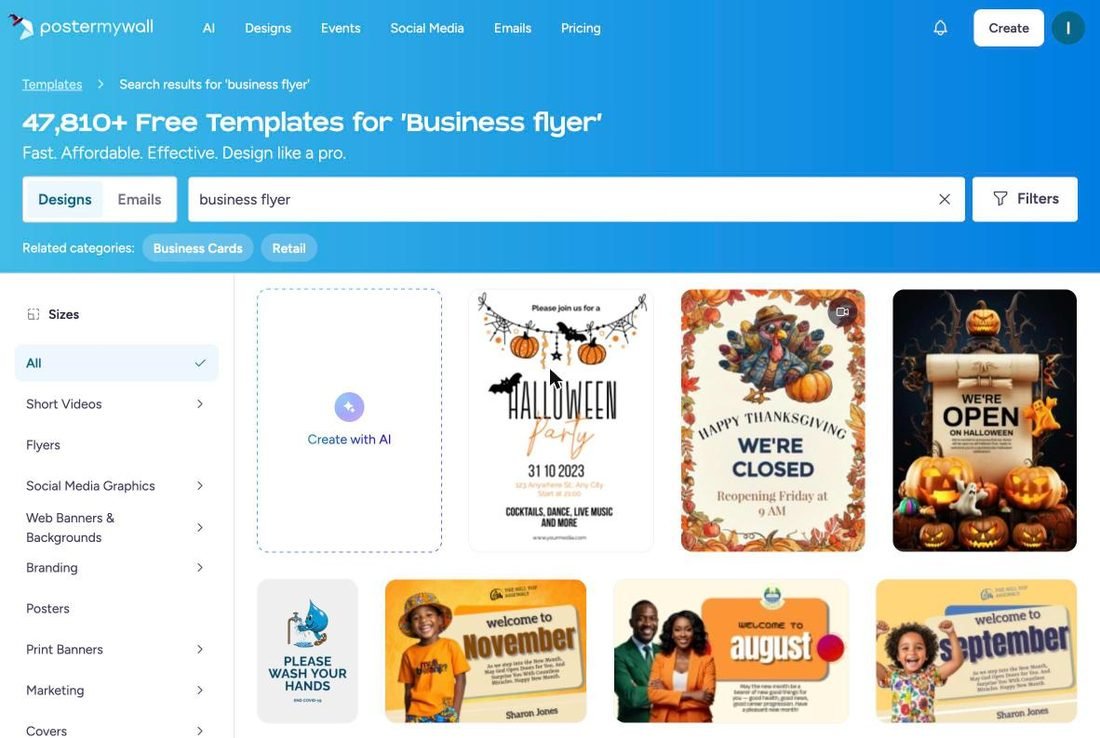
The size of the library is real — PosterMyWall lists 4 million+ templates — but finding the right one takes scrolling. A search for “business flyer” returned over 48,000 results, and the first two rows were Halloween, Thanksgiving and “welcome to November” designs. The first actual business flyer was in the third row. That ordering helps if you are making a timely holiday post; for an evergreen flyer, expect to scroll. Many templates are contributed by the community (the designer’s name appears on the preview), so quality varies more than in a fully in-house library.
The stock library is broad: photos, videos (including 4K clips), stickers, shapes and audio, searchable from the editor. Premium plans include a license for Getty Images content — you accept Getty’s license terms the first time you add one of their images.
AI Tools: What Worked and What Didn’t
PosterMyWall’s AI runs on credits. Premium includes 100 credits a month and Premium Plus 250; monthly plan credits expire at the end of each month, while purchased credit packs don’t. Here is what our tests cost and how they went.
| Task | Time | Credits | Result |
|---|---|---|---|
| AI redesign of a flyer template (1st prompt) | ~50 sec | 2 | Text replaced, layout unchanged, half the page left empty |
| Follow-up prompt (“make it look like a bakery”) | ~60 sec | 2 | Good, usable flyer with warm colors and a pastry photo |
| Convert AI flyer to editable text (Beta) | ~3.5 min | 0 | Worked; text became editable |
| Background remover | ~25 sec | 1 | Clean edges, but dropped some objects |
| AI video from the flyer | ~3 min | 9 | 8-second 1080p clip with a slow zoom |
AI redesign: the second prompt is the one that counts
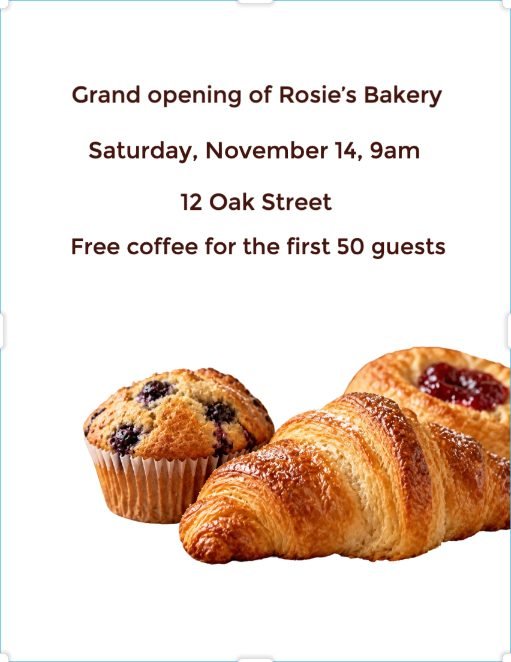
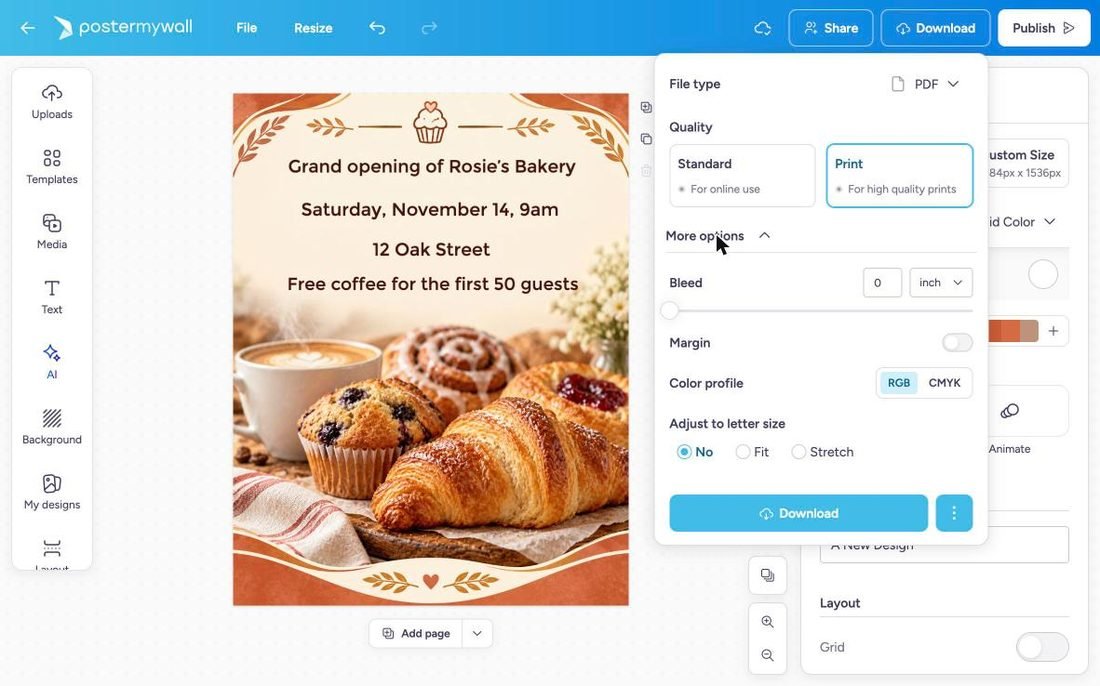
From a template preview you can type what your event is about and let the AI rebuild the design. Our first prompt — a bakery grand opening with date, address and a free-coffee offer — only swapped the text into the original business-card template, leaving its blue-and-gold frame and an empty lower half. A follow-up asking for warm colors and a photo of fresh pastries produced a flyer we would actually print.

Two things to know. First, the AI output is a flat image: to change the text you choose Edit → Editable text (Beta), which took about three and a half minutes in our test but then let us edit the address normally. Second, the AI version came out at a custom size (1184 × 1536 px), not US Letter, even though we started from a Letter template. The PDF export can fit or stretch it to Letter size, but check the margins before printing.
Background remover, animation and AI video
The background remover took about 25 seconds and 1 credit. On our pastry photo it cut out the croissant, muffin and danish with clean edges, but treated the coffee cup and cinnamon roll as background and removed them. Undo restored the original instantly.
For motion there are two routes. Animate adds entrance and exit effects (fade, pop, slide, bounce and others) without using credits. Turn into video uses AI: it cost 9 credits, took about three minutes, and produced an 8-second 1080p clip with a slow camera zoom and the text still readable. The clip can’t be edited afterwards, and audio is off by default, so finish the design first.
AI Images also worked in our test (the generate button shows 1 credit per image). On our first two attempts, on 26 October, a credit-purchase window opened even though the account had unused plan credits; PosterMyWall confirmed that shouldn’t happen, and by 27 October generation worked normally.
Print and Export
This is where PosterMyWall’s poster-and-flyer roots show. The PDF export has a Print quality option with bleed, margins, a choice of RGB or CMYK color profile, and an “adjust to letter size” setting. That covers what a local print shop usually asks for. Other formats are JPG, WebP, PNG (with transparent background), GIF, MP4 and transparent WebM video.
On the Free plan, standard downloads are limited and high-quality downloads are paid per design, starting at $5.99 (high-resolution image downloads are $5.99 for up to 9 pages and $14.95 for 10 or more; video projects are $14.95). Premium plans include unlimited high-quality downloads.
Social, Email and Event Pages
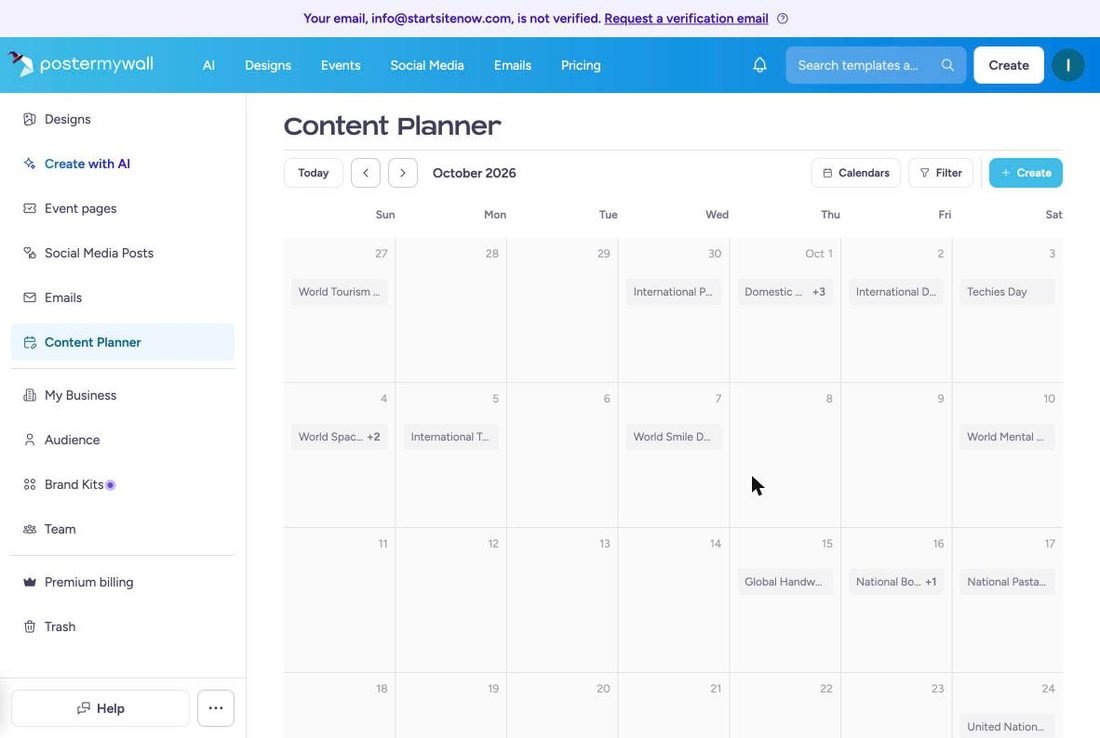
Social media. You can publish to Facebook Pages, Instagram Business accounts, X, TikTok, LinkedIn (profiles and pages), YouTube (Shorts and videos), Pinterest, Google Business Profile and Threads. Scheduling for later needs a paid plan; Free connects 1 account, Premium 3 and Premium Plus unlimited. The Content Planner shows scheduled posts and emails on one calendar and pre-fills it with holidays and awareness days, which is handy if you post for a shop or venue and run out of ideas.
Email marketing. All plans include 3,000+ email templates and sign-up forms, but the Free plan is export-only. Premium sends up to 3,000 tracked emails a month and Premium Plus up to 10,000, with open and click tracking, scheduling and an AI writer; Premium Plus adds a custom sender address. That is enough for a small customer list, though a dedicated tool from our email marketing comparison gives you more automation.
Event pages. You can turn a flyer into an event page with registrations, and the official feature pages describe QR-code tickets that are scanned at the door, with payment online or at the venue. Free includes 2 event pages a month with up to 100 registrations, Premium 10 a month and Premium Plus unlimited; only Premium Plus removes the PosterMyWall watermark and supports recurring events. We did not publish an event page during the test, so we can’t comment on the attendee side.
PosterMyWall Pricing 2026
| Free | Premium | Premium Plus | |
|---|---|---|---|
| Price | $0 | $13/mo or $109/yr | $30/mo or $319/yr |
| AI credits / month | None | 100 | 250 |
| High-quality downloads | Pay per download (from $5.99) | Unlimited | Unlimited |
| AI images, video, background remover | No | Yes | Yes |
| Brand Kits | No | 1 | Unlimited |
| Social accounts / scheduling | 1 / no | 3 / yes | Unlimited / yes |
| Email sends / month | Export only | 3,000 | 10,000 |
| Event pages / month | 2 (100 registrations) | 10 | Unlimited, no watermark |
| Team collaboration | No | Yes | Yes |
US prices before tax, checked on PosterMyWall’s pricing page on 26–27 October 2026. Extra credit packs: 100 credits for $19, 400 for $67, 1,000 for $149, 2,000 for $293. Team discounts are available for 2+ seats.
Pros and Cons
✓ Pros
- Design plus promotion in one plan — social scheduling, email and event pages built in
- Print-ready PDFs — bleed, margins and CMYK
- Fast template editing — about a minute for a simple post
- AI redesign gets there with a follow-up prompt — usable flyer for 4 credits
- Nine social platforms, including Google Business Profile and Threads
- Content Planner pre-filled with marketing dates
- Affordable yearly Premium at $109
✗ Cons
- Template search favors timely designs — handy for holiday posts, but evergreen templates take scrolling
- AI output is a flat image — converting to editable text took 3.5 minutes
- AI size can drift — our Letter flyer came out at a custom size
- Background remover can over-cut — it removed objects we wanted to keep
- AI video is not editable and costs 9 credits per clip
- Text boxes don’t grow with longer text
- Free plan is limited — no AI, paid high-quality downloads, no email sends
PosterMyWall vs Canva
Canva is the stronger pure design tool: a more polished editor, a more consistent template library and a broader set of AI features. Both can schedule social posts (Canva Pro to 8 platforms, PosterMyWall to 9). PosterMyWall’s advantage is what comes after the design: event pages with registrations and email campaigns with send tracking are part of the same subscription, and its yearly Premium plan ($109) costs less than Canva Pro ($144/yr).
| PosterMyWall | Canva | |
|---|---|---|
| Best for | Promoting events, shops and venues | General design for non-designers |
| Paid plan (yearly) | $109/yr (Premium) | $144/yr (Pro) |
| Social scheduling | 9 platforms (paid plans) | 8 platforms (Pro) |
| Email sends & event pages | Included | See our Canva review |
| Template consistency | Mixed (large community library) | Stronger |
For a deeper look at Canva and its closest rival, see our Canva review and Canva vs Adobe Express.
Frequently Asked Questions
Is PosterMyWall free?
Yes. The Free plan gives you the templates, the editor, free resizing and video editing, but standard downloads are limited, high-quality downloads cost from $5.99 each, there are no AI tools, and email campaigns can only be exported, not sent. Premium starts at $13/month or $109/year.
Is PosterMyWall Premium worth it?
If you regularly promote events or a local business, yes: unlimited high-quality downloads, 100 AI credits a month, social scheduling, 3,000 email sends and 10 event pages a month cost $109 a year. If you only make the occasional graphic, the Free plan with pay-per-download, or Canva, is likely enough.
Can I print designs from PosterMyWall?
Yes. The PDF export has a Print quality option with bleed, margins and a CMYK color profile, which is what most print shops ask for. If you create a design with AI, check its size first: ours came out at a custom size and needed the “adjust to letter size” option.
How do PosterMyWall credits work?
AI features use credits: in our test an AI redesign cost 2 credits, background removal 1 and an AI video 9. Premium includes 100 credits a month and Premium Plus 250; monthly plan credits expire at the end of each month. Extra packs start at 100 credits for $19 and don’t expire.
Can PosterMyWall post to social media automatically?
Yes. You can publish and schedule posts to Facebook Pages, Instagram Business, X, TikTok, LinkedIn, YouTube, Pinterest, Google Business Profile and Threads. Scheduling requires Premium or Premium Plus.
Is PosterMyWall better than Canva?
For pure design, Canva is better. For a small business that needs flyers plus event registrations, email sends and social scheduling in one subscription, PosterMyWall covers more of the job, and its yearly Premium plan ($109) costs less than Canva Pro.
Final Verdict
Rating: 4.4 out of 5
PosterMyWall is a practical choice for local businesses, venues and event organizers who need to make promotional material and then actually promote it. In our tests, editing templates was fast, the print PDF settings were solid, and the AI produced a good flyer once we gave it a second, more specific prompt. The template search, flat AI output and occasional over-eager background removal mean it is not as smooth as Canva for pure design. But with event pages, email sends and social scheduling included, the $109-a-year Premium plan covers more of a small business’s marketing than most design tools. For a business that would otherwise pay for Canva Pro plus a separate email tool and an event platform, it is the better value.
* How we handle sponsorships. We accept sponsorships only on terms that protect our independence. Some companies pay to be included in our comparisons or reviewed. Payment is made up front and never affects our verdict, score or position in the list: we test and rank every product the same way. A sponsor can ask us to remove their listing at any time, but cannot change what we wrote. We also earn affiliate commissions on some links, which never affect our rankings either.